
Data version control is the practice of tracking exact, content-addressed copies of datasets and linking those artifacts directly to the code, parameters, and pipeline steps that produced them, so any result can be reproduced later. Your immediate first step: decide whether your project works with flat files (images, sequencing reads, raw CSVs) or structured relational tables, then attach provenance metadata and a content fingerprint to every dataset you commit.
At a glance:
- Traceability: every dataset version links back to the exact code commit and parameter set that created it.
- Integrity: content-addressed identifiers (hashes) confirm a file has not changed since it was recorded.
- Reproducibility: anyone with access to the metadata and remote storage can reconstruct the exact experimental state.
Table of Contents
- What does data version control enable for reproducible research?
- How do file-based and table-based versioning tools differ?
- How does data version control work in practice?
- How do you choose the right versioning approach?
- How do you version sensitive or regulated data safely?
- What storage backends and integrations should you consider?
- A minimal reproducible workflow you can start today
- When is data version control more overhead than it's worth?
- Which tools and resources should you explore further?
- Key Takeaways
- Why reproducibility infrastructure matters more than most teams realize
- Oltodiscovery connects your protocols to your data provenance
- Useful sources
What does data version control enable for reproducible research?
Provenance records answer two questions that reviewers and future collaborators will always ask: what data was used, and how was it transformed? A provenance record captures the lineage from raw input to final result, including every intermediate transformation, parameter choice, and software version. Without it, a result is a claim; with it, a result is verifiable.
Fingerprints) map large data artifacts to compact unique identifiers, acting as digital signatures for integrity checks and fast comparisons without transferring full datasets. A SHA-256 hash of a large sequencing file takes milliseconds to verify and fits in a single line of a metadata file. That compact identifier is what makes content-addressed data practical at research scale.
Provenance records are central to reproducible science. Version control should capture not just file snapshots but the how and why of transformations — the parameters, the environment, and the intent behind each step.
DVC creates snapshots that connect data versions with code commits to produce a single project history supporting restore and reproduce operations. That shared history is what lets a colleague six months later run one command and land in the exact experimental state you published.
How do file-based and table-based versioning tools differ?
File-based tools track directories and large binaries with snapshot-style metadata; database versioning tracks rows and schema changes and supports table-level branching and merging. Choosing between them comes down to your data model.
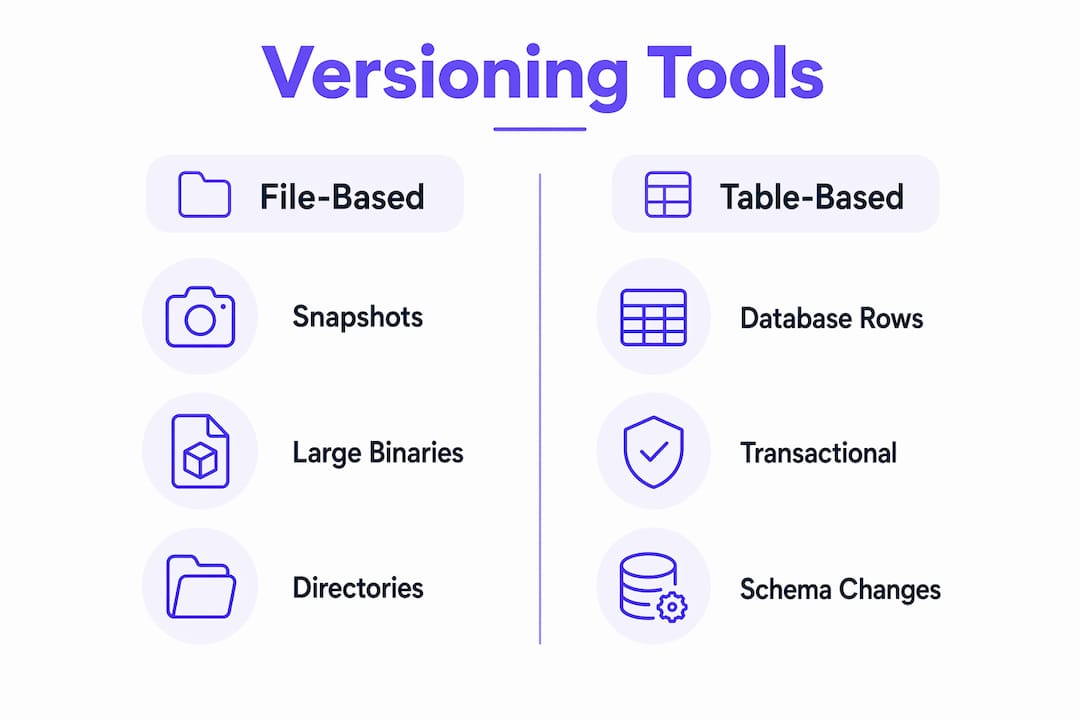
| Dimension | File-based (DVC, DataLad) | Table/DB-based (Dolt) |
|---|---|---|
| Data model | Flat files, directories, binaries | Relational tables, rows, schemas |
| Large-file handling | Stores hash pointers in Git; bulky files go to external remotes | Tables stored natively; large blobs less natural |
| Provenance & pipeline integration | Native DAG pipelines; deep provenance capture | SQL-level row history; limited pipeline DAG support |
| Collaboration / branching | Git-style branches on metadata; data synced separately | Full SQL branch/merge on table state |
| Storage backends | S3, GCS, Azure Blob, SSH, on-prem | Built-in storage; remote replication available |
| Ease of adoption | Moderate; requires Git familiarity | Low for SQL users; unfamiliar for file-centric teams |
| Privacy / access control | Remote-level ACLs; encrypted remotes supported | Database-level permissions |
Which pattern fits your work?
- Imaging, sequencing, or raw instrument files — file-based tools (DVC or DataLad) are the natural fit.
- Structured phenotype tables, assay results, or relational lab records — table versioning (Dolt) handles branching and merging on row-level data cleanly.
- Hybrid projects — version the file artifacts with DVC and the derived tables with Dolt or a lightweight database snapshot strategy.
How does data version control work in practice?
Four building blocks connect your data to reproducible results.

Content-addressing and fingerprinting. Every tracked artifact gets a hash computed from its contents. Change one byte and the hash changes. This means you never need to compare two 10 GB files directly; you compare their content-addressed identifiers) instead.
Metafiles as lightweight placeholders. DVC stores metadata in human-readable .dvc files and dvc.yaml in Git, while the bulky artifacts live in a cache or external remote. Git tracks the pointer; the remote holds the payload. A .dvc file for a 2 GB imaging dataset is a few lines of YAML.
Pipelines and DAGs. Automated pipelines define computational graphs connecting stages so a change in one input triggers only the downstream steps that depend on it. For a sequencing pipeline with alignment, variant calling, and annotation stages, only the steps downstream of a changed reference file re-run.
The connection diagram in plain terms: your Git repository holds code plus metafiles; a remote object store (S3, GCS, or SSH) holds the actual data artifacts; a CI system or local runner reads the metafiles, pulls the correct artifact versions, executes the pipeline, and writes new metafiles back to Git.
Pro Tip: Name your .dvc metafiles and pipeline stages after the biological or engineering concept they represent (e.g., raw_counts.dvc, alignment_stage), not after file paths. This makes the DAG readable to collaborators who did not write the pipeline.
How do you choose the right versioning approach?
Work through these questions before committing to a tool or workflow.
- What is your primary data model? Flat files and binaries point to DVC or DataLad; relational tables point to Dolt or a snapshot-based approach.
- How large are individual artifacts? Files above a few hundred MB need an external remote; anything that fits in a Git repository comfortably (under ~50 MB) may not need a specialized tool at all.
- Do you work with binary blobs? Microscopy images, gel scans, and raw instrument outputs are binary. File-based tools handle these natively; table-based tools do not.
- How will your dataset grow? A project that doubles in size every six months needs a scalable remote (S3 or GCS) from day one, not a local SSH mount.
- Do collaborators need to branch and merge data? If multiple team members run parallel experimental arms on the same dataset, branching support matters. DataLad supports subdataset modularity; Dolt supports SQL-level branching.
- What storage backends are available to you? Institutional HPC clusters often provide SSH or NFS mounts; cloud-native teams default to S3 or GCS. Confirm access before choosing a tool.
- What is your CI environment? If you run GitHub Actions or GitLab CI, DVC integrates with both via standard shell commands. Factor in the setup time for your specific runner.
- Are there privacy or compliance constraints? Regulated human data (IRB-covered studies, HIPAA-adjacent datasets) requires access-controlled remotes and may require metadata minimization.
How do you version sensitive or regulated data safely?
Provenance capture does not automatically mean public exposure. A provenance record can contain only the hash of a dataset and the transformation parameters, with no raw data included. The hash proves integrity; the raw data stays behind an access-controlled remote.
Practical controls for sensitive data:
- Access-limited remotes: configure S3 bucket policies or GCS IAM roles so only authorized team members can pull artifacts.
- Encrypted storage: use server-side encryption (SSE-S3 or customer-managed keys) for data at rest; use TLS for data in transit.
- Metadata minimization: record only what is needed for reproducibility (hash, parameters, software version); strip participant identifiers from metafiles committed to Git.
- Per-copy fingerprinting: when sharing derived datasets with external collaborators, assign each recipient a unique fingerprint. Privacy-preserving fingerprinting can provide both entry-level differential privacy guarantees and liability tracing simultaneously, reducing utility loss compared to two-step approaches.
Audit trails matter for compliance. Every dvc commit and git commit creates a timestamped record of who changed what and when. For IRB-covered studies, retain these logs alongside your data management plan.
Pro Tip: Before pushing any metafile to a public Git repository, run a grep for participant IDs, file paths containing PHI, or institution-specific identifiers. A .dvcignore file can prevent accidental staging of sensitive files.
What storage backends and integrations should you consider?
| Backend | Best for | Key tradeoff |
|---|---|---|
| Amazon S3 | Cloud-native teams, large datasets | Cost scales with storage and egress |
| Google Cloud Storage | GCP-integrated workflows | Similar cost model to S3 |
| Azure Blob Storage | Azure HPC or institutional cloud | Best when institution already uses Azure |
| SSH / SFTP | HPC clusters, on-prem servers | Free but slower; no native versioning |
| Local directory | Single-machine development only | Not shareable; no redundancy |
Integrating with Git is straightforward: DVC keeps metadata in Git and large files in the configured remote. For team use, set a shared remote once (dvc remote add) and commit the .dvc/config file so every team member pulls from the same location.
A critical warning: storing large data files directly in Git leads to repository bloat and performance problems. Even a few 500 MB files will make git clone and git checkout painfully slow and will exceed most hosting limits. Keep hashed pointers in Git; keep bulk artifacts in the remote.
A minimal reproducible workflow you can start today
- Initialize your repository. Run
git initanddvc initin your project directory. This creates the.dvc/configuration folder and adds the cache to.gitignore. - Track your first dataset. Run
dvc add data/raw_counts.csv. DVC moves the file to its cache, createsdata/raw_counts.csv.dvc, and adds the original file to.gitignore. - Commit the metafile. Run
git add data/raw_counts.csv.dvc .gitignore && git commit -m "Track raw counts dataset". The hash is now in Git history. - Define a pipeline stage. Add a stage in
dvc.yamlthat maps your input data, script, parameters, and output. This is the DAG entry point. - Configure a remote. Run
dvc remote add -d myremote s3://your-bucket/projectand commit.dvc/config. Team members can now pull the exact artifact withdvc pull. - Run and verify. Execute
dvc reproto run the pipeline. DVC checks hashes, skips unchanged stages, and records outputs. Commit the updateddvc.lockfile. - Include the fingerprint in your protocol documentation. Copy the artifact hash from the
.dvcfile into your protocol's data provenance section so the link between data and method is explicit.
Pro Tip: Keep a params.yaml file for all tunable parameters and reference it in dvc.yaml. This way, a parameter change automatically invalidates the downstream stages that depend on it, and the parameter history lives in Git.
When is data version control more overhead than it's worth?
Not every project needs a full DVC or DataLad setup.
- Very small, static datasets (a single CSV under 1 MB that never changes) are adequately versioned by Git alone.
- Ad-hoc one-off analyses where reproducibility is not a stated goal and the dataset will not be reused do not justify the setup cost.
- Strict real-time database updates where data changes continuously and branching is operationally impossible are better served by database transaction logs than by snapshot-based versioning.
For teams that do need versioning but find full pipeline automation premature, two lighter patterns work well: metadata-only versioning (record the hash and source URL of each dataset in a plain YAML file committed to Git) and sample-only versioning (version a representative sample of a large dataset to validate pipelines, with the full dataset referenced by URL and hash in documentation). Both preserve integrity and provenance without the full operational overhead.
Which tools and resources should you explore further?
File-based tools:
- DVC demonstrates the metadata-in-Git, artifacts-in-remote pattern and includes native pipeline DAG support. Start with the DVC user guide.
- DataLad captures full provenance records and supports hierarchical datasets built from subdatasets, making it well-suited for neuroscience and genomics workflows where datasets nest inside larger collections.
Table-based tools:
- Dolt applies Git-style branching and merging to SQL tables, useful when your primary artifacts are structured relational datasets rather than files.
For deeper reading on fingerprinting and provenance:
"Fingerprints (hashes) act as digital signatures for data integrity checks and fast comparisons." The IEEE standard on collusion-secure fingerprinting and the PMC article on privacy-preserving database fingerprinting are the two most rigorous peer-reviewed treatments of fingerprint robustness for research data.
For reproducible workflow examples in life sciences, the public projects on Oltodiscovery show how content-addressed fingerprints and provenance records are embedded directly in published protocols.
Key Takeaways
Choosing between file-based and table-based versioning, adding content-addressed fingerprints, and keeping bulk artifacts in an external remote are the three decisions that determine whether your data workflow is reproducible.
| Point | Details |
|---|---|
| File vs. table versioning | Match the tool to your data model: file-based for binaries and directories, table-based for relational data. |
| Content-addressed fingerprints | Hash-based identifiers verify artifact integrity without transferring full datasets. |
| Metadata in Git, data in remote | Keep .dvc metafiles in Git and bulk artifacts in S3, GCS, or SSH to avoid repository bloat. |
| Privacy-preserving fingerprinting | Per-copy fingerprints can provide both differential privacy and leak tracing for sensitive datasets. |
| Oltodiscovery for protocol provenance | Oltodiscovery embeds content-addressed fingerprints and reproducibility passports directly into experimental protocols, connecting data versioning to publication-ready documentation. |
Why reproducibility infrastructure matters more than most teams realize
The conventional wisdom frames data version control as a convenience for large ML teams. That framing misses the point for bench scientists and small engineering groups. The real value is not recovering a previous file; it is being able to hand a protocol and a dataset fingerprint to a reviewer, a regulator, or a new lab member two years from now and have them reconstruct exactly what you did. That is a different problem than file recovery, and it requires a different solution: immutable provenance records, not just backups.
Small teams often resist adoption because the setup feels like infrastructure work rather than science. The honest answer is that it is both. The teams that build this habit early spend less time debugging irreproducible results later, and their publications carry more credibility when data lineage is traceable from raw input to final figure.
Oltodiscovery's approach of embedding content-addressed fingerprints directly into experimental protocols reflects this philosophy: provenance should be part of the protocol, not an afterthought appended at submission.
Oltodiscovery connects your protocols to your data provenance
Oltodiscovery is built specifically for independent researchers and small scientific teams who need reproducibility without the overhead of enterprise lab informatics. Every protocol generated on the platform carries a deterministic fingerprint and a public Reproducibility Passport, so the link between your experimental design and your data artifacts is explicit and verifiable from day one.
For teams adopting data version control, Oltodiscovery reduces the friction of connecting protocol documentation to data provenance. You get content-addressed protocol fingerprints, guided test runs, and browser-based statistical analysis in one place, without configuring separate tools for each layer of the research lifecycle. Browse the Open Protocol Library to see reproducibility artifacts in practice, or visit Oltodiscovery to start a free trial and generate your first fingerprinted protocol.
Useful sources
- DVC User Guide — primary documentation for the metadata-in-Git, artifacts-in-remote pattern and pipeline DAG configuration.
- DataLad — documentation for provenance-focused, hierarchical dataset versioning.
- DVC: Versioning Data and Models — use-case guide covering snapshot creation and single project history.
- DVC GitHub repository — source code and issue tracker; useful for understanding DAG change detection and community-reported workflows.
- Privacy-Preserving Database Fingerprinting (PMC) — peer-reviewed treatment of combining differential privacy with fingerprint robustness for relational databases.
- Collusion-Secure Fingerprinting for Digital Data (IEEE Xplore) — foundational IEEE paper on fingerprint robustness and collusion resistance.
- Oltodiscovery Fingerprint Specification — technical specification for deterministic protocol fingerprints and verification workflows.
- Oltodiscovery Open Protocol Library — public library of fingerprinted, publication-ready experimental protocols.
- For regulated human data: consult your institution's IRB guidance and your data management plan before configuring any public or shared remote storage.